Writing service and client. C++
This sections shows how nodes can communicate with each other through services. The node that sends a request is called the client node, while the node that responds to the request sending the response is called the service node. The programs for the client and service nodes will be developed in C++.
Setup for working with services
Make sure to be in a brand new terminal window and no ROS command is currently running.
Create a new package. This package should be contained in the ros2_ws workspace, within its /src folder. The name provided to this new package will be cpp_srvcli.
ros2 pkg create --build-type ament_cmake --license Apache-2.0 cpp_srvcli --dependencies rclcpp example_interfaces
The --dependencies argument will automatically add the necessary dependency lines to package.xml. In this case, example_interfaces is the package that includes the AddTwoInts.srv file that is needed to structure the requests and responses of this example. See below its data structure:
int64 a
int64 b
---
int64 sum
For more reference on package creation consult the package creation section.
Writing the service node. C++
Inside this package, spsecifically in cpp_srvcli/src create a cpp script, name it add_two_ints_server.cpp.
Copy this content into the new cpp script.
#include "rclcpp/rclcpp.hpp"
#include "example_interfaces/srv/add_two_ints.hpp"

#include <memory>

void add(const std::shared_ptr<example_interfaces::srv::AddTwoInts::Request> request,
         std::shared_ptr<example_interfaces::srv::AddTwoInts::Response>      response)
{
response->sum = request->a + request->b;
RCLCPP_INFO(rclcpp::get_logger("rclcpp"), "Incoming request\na: %ld" " b: %ld",
               request->a, request->b);
RCLCPP_INFO(rclcpp::get_logger("rclcpp"), "sending back response: [%ld]", (long int)response->sum);
}

int main(int argc, char **argv)
{
rclcpp::init(argc, argv);

std::shared_ptr<rclcpp::Node> node = rclcpp::Node::make_shared("add_two_ints_server");

rclcpp::Service<example_interfaces::srv::AddTwoInts>::SharedPtr service =
   node->create_service<example_interfaces::srv::AddTwoInts>("add_two_ints", &add);

RCLCPP_INFO(rclcpp::get_logger("rclcpp"), "Ready to add two ints.");

rclcpp::spin(node);
rclcpp::shutdown();
}
1. Service node, C++. Examining the code.
The first lines correspond to import libraries.
#include "rclcpp/rclcpp.hpp"
#include "example_interfaces/srv/add_two_ints.hpp"

#include <memory>
#include "rclcpp/rclcpp.hpp": This includes the ROS 2 C++ library headerrclcpp.hpp, which contains the core functionality of the ROS 2 client library for C++.#include "example_interfaces/srv/add_two_ints.hpp": This includes the header file for theAddTwoIntsservice message type. This is necessary to use theAddTwoIntsservice.#include <memory>: This is a standard library in C++ that provides smart pointers and memory management utilities.
Next, a void method is implemented
void add(const std::shared_ptr<example_interfaces::srv::AddTwoInts::Request> request,
            std::shared_ptr<example_interfaces::srv::AddTwoInts::Response>      response)
   {
   response->sum = request->a + request->b;
   RCLCPP_INFO(rclcpp::get_logger("rclcpp"), "Incoming request\na: %ld" " b: %ld",
                  request->a, request->b);
   RCLCPP_INFO(rclcpp::get_logger("rclcpp"), "sending back response: [%ld]", (long int)response->sum);
   }
void add(const std::shared_ptr<example_interfaces::srv::AddTwoInts::Request> request, std::shared_ptr<example_interfaces::srv::AddTwoInts::Response> response): This defines a function namedaddthat takes two arguments: a shared pointer to the request message (example_interfaces::srv::AddTwoInts::Request) and a shared pointer to the response message (example_interfaces::srv::AddTwoInts::Response).response->sum = request->a + request->b;: This calculates the sum of the two integersaandbreceived in the request and stores the result in thesumfield of the response message.RCLCPP_INFO(...): This logs information messages using the ROS 2 logging mechanism. It prints the incoming request values (aandb) as well as the response value (sum) to the console.
Finally, the main section:
int main(int argc, char **argv)
{
rclcpp::init(argc, argv);

std::shared_ptr<rclcpp::Node> node = rclcpp::Node::make_shared("add_two_ints_server");

rclcpp::Service<example_interfaces::srv::AddTwoInts>::SharedPtr service =
   node->create_service<example_interfaces::srv::AddTwoInts>("add_two_ints", &add);

RCLCPP_INFO(rclcpp::get_logger("rclcpp"), "Ready to add two ints.");

rclcpp::spin(node);
rclcpp::shutdown();
}
int main(int argc, char **argv): This is the entry point of the program. It takes command-line argumentsargc(argument count) andargv(argument vector).rclcpp::init(argc, argv);: This initializes the ROS 2 C++ client library.std::shared_ptr<rclcpp::Node> node = rclcpp::Node::make_shared("add_two_ints_server");: This creates a shared pointer to a ROS 2 node namedadd_two_ints_server.rclcpp::Service<example_interfaces::srv::AddTwoInts>::SharedPtr service = node->create_service<example_interfaces::srv::AddTwoInts>("add_two_ints", &add);: This creates a service server for theAddTwoIntsservice. It associates the service with the functionaddand registers it with the ROS 2 node.RCLCPP_INFO(...): This logs an information message indicating that the service server is ready to receive requests.rclcpp::spin(node);: This blocks the main thread, allowing the ROS 2 node to process callbacks (e.g., incoming service requests).rclcpp::shutdown();: This shuts down the ROS 2 node whenrclcpp::spin()returns (e.g., when the program is terminated).
2. Service, C++. Adding dependencies
Once the C++ script is ready, make sure the dependencies to run this script are correctly configured in the ROS 2 environment. Navigate to cpp_srvcli/package.xml and check that the dependecies are already added for this case, since at the moment of the package creation it was executed: --dependencies rclcpp example_interfaces.
<depend>rclcpp</depend>
<depend>example_interfaces</depend>
About the <depend> tags:
- This tag is a more general declaration of dependency. It’s used to specify both build-time and runtime dependencies. <depend> includes both the dependencies needed for compilation and those needed at runtime. It encompasses a wider range of dependencies compared to <exec_depend>.
3. Service, C++. Adding the executable
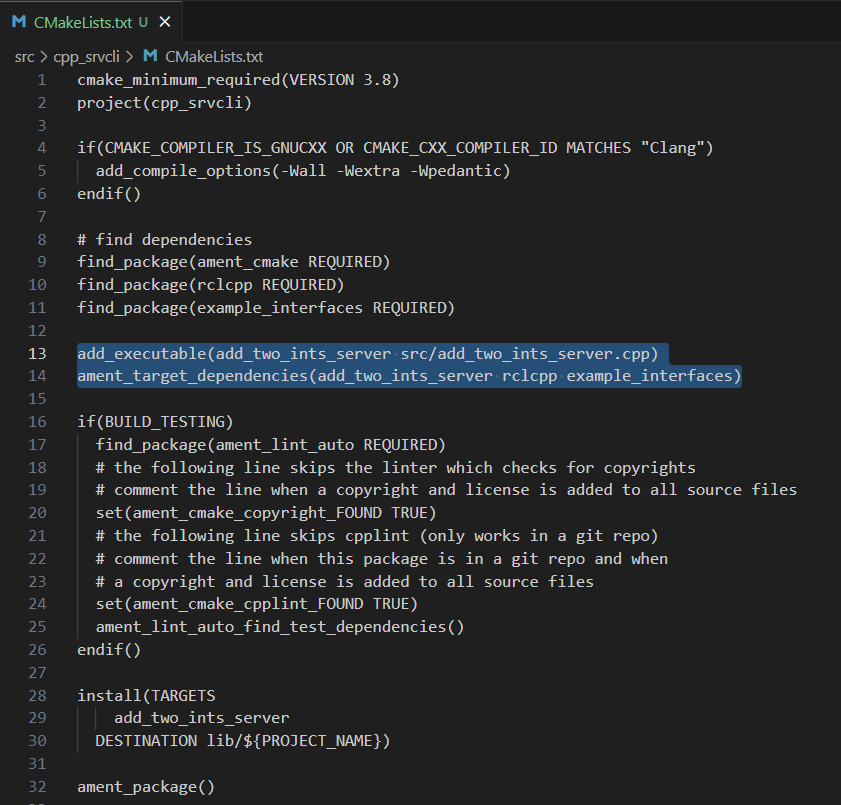
Navigate to cpp_srvcli/CMakeLists.txt and add the following below the existing dependency find_package(example_interfaces REQUIRED):
add_executable(server src/add_two_ints_server.cpp)
ament_target_dependencies(server rclcpp example_interfaces)
After this addition, include the following to the end of the file, right before ament_package():
install(TARGETS
 server
DESTINATION lib/${PROJECT_NAME})
Once everything is added, the CMakeLists.txt file should be similar to:
4. Build server node and run
At this point the script is created, the dependencies configured and the CMakeLists.txt file is correclty setup.
Open a brand new terminal, make sure that no other ROS 2 command is currently running, navigate to the workspace directory and execute either of these two commands:
colcon build --packages-select cpp_srvcli
colcon build
The first command will build only the specified package. While the second one will build all packages of the workspace.
If the first command was used, a message similar to this one, should be expected after building the workspace:
Starting >>> cpp_srvcli
[Processing: cpp_srvcli]
Finished <<< cpp_srvcli [37.4s]

Summary: 1 package finished [41.0s]
Now, source the setup file:
source install/setup.bash
For more reference on sourcing the setup file, see sourcing the setup file.
And run the server node that was recently created.
ros2 run cpp_srvcli add_two_ints_server
As a result, the following message will be displayed:
[INFO] [1712330435.947184503] [rclcpp]: Ready to add two ints.
Open a new terminal and execute:
ros2 service list
This will result in something similar to:
/add_two_ints
/add_two_ints_server/describe_parameters
/add_two_ints_server/get_parameter_types
/add_two_ints_server/get_parameters
/add_two_ints_server/list_parameters
/add_two_ints_server/set_parameters
/add_two_ints_server/set_parameters_atomically
Here, it can be seen that the service that was created in the add_two_ints_server.cpp cpp script is indeed present and ready to be called, that is: /add_two_ints service.
Finally, call the /add_two_ints service. Execute:
ros2 service call /add_two_ints example_interfaces/srv/AddTwoInts "{a: 2, b: 3}"
This will result in:
requester: making request: example_interfaces.srv.AddTwoInts_Request(a=2, b=3)

response:
example_interfaces.srv.AddTwoInts_Response(sum=5)
The service that was created was just called directly from the terminal.
What is going to be performed next, is to consume this service through a node. Its coding will be shown below.
Client node in C++
Navigate to cpp_srvcli/src and create a cpp script called: add_two_ints_client.cpp. Copy this content into the new cpp script.
#include "rclcpp/rclcpp.hpp"
#include "example_interfaces/srv/add_two_ints.hpp"

#include <chrono>
#include <cstdlib>
#include <memory>

using namespace std::chrono_literals;

int main(int argc, char **argv)
{
rclcpp::init(argc, argv);

if (argc != 3) {
      RCLCPP_INFO(rclcpp::get_logger("rclcpp"), "usage: add_two_ints_client X Y");
      return 1;
}

std::shared_ptr<rclcpp::Node> node = rclcpp::Node::make_shared("add_two_ints_client");
rclcpp::Client<example_interfaces::srv::AddTwoInts>::SharedPtr client =
   node->create_client<example_interfaces::srv::AddTwoInts>("add_two_ints");

auto request = std::make_shared<example_interfaces::srv::AddTwoInts::Request>();
request->a = atoll(argv[1]);
request->b = atoll(argv[2]);

while (!client->wait_for_service(1s)) {
   if (!rclcpp::ok()) {
      RCLCPP_ERROR(rclcpp::get_logger("rclcpp"), "Interrupted while waiting for the service. Exiting.");
      return 0;
   }
   RCLCPP_INFO(rclcpp::get_logger("rclcpp"), "service not available, waiting again...");
}

auto result = client->async_send_request(request);
// Wait for the result.
if (rclcpp::spin_until_future_complete(node, result) ==
   rclcpp::FutureReturnCode::SUCCESS)
{
   RCLCPP_INFO(rclcpp::get_logger("rclcpp"), "Sum: %ld", result.get()->sum);
} else {
   RCLCPP_ERROR(rclcpp::get_logger("rclcpp"), "Failed to call service add_two_ints");
}

rclcpp::shutdown();
return 0;
}
1. Service client, cpp. Examining the code.
The first lines correspond to import libraries. These are the similar libraries as in the service node example.
#include "rclcpp/rclcpp.hpp"
#include "example_interfaces/srv/add_two_ints.hpp"

#include <chrono>
#include <cstdlib>
#include <memory>

using namespace std::chrono_literals;
#include <chrono>: This includes the<chrono>header file, which provides facilities for time-related functionality.#include <cstdlib>: This includes the<cstdlib>header file, which provides general utilities.#include <memory>: This includes the<memory>header file, which is necessary for using smart pointers likestd::shared_ptr.using namespace std::chrono_literals;: This line introduces thestd::chrono_literalsnamespace, allowing you to use time literals like 1s (1 second) in the code.
Next, the main function. This will be explained by parts. The first part is:
int main(int argc, char **argv)
{
rclcpp::init(argc, argv);

if (argc != 3) {
      RCLCPP_INFO(rclcpp::get_logger("rclcpp"), "usage: add_two_ints_client X Y");
      return 1;
}
rclcpp::init(argc, argv);: This initializes the ROS 2 C++ client library.if (argc != 3) { ... }: This condition checks if the program is invoked with exactly 3 arguments (including the program name). If not, it prints usage information and returns with an error code.
Now the second part:
std::shared_ptr<rclcpp::Node> node = rclcpp::Node::make_shared("add_two_ints_client");
rclcpp::Client<example_interfaces::srv::AddTwoInts>::SharedPtr client =
   node->create_client<example_interfaces::srv::AddTwoInts>("add_two_ints");
std::shared_ptr<rclcpp::Node> node = rclcpp::Node::make_shared("add_two_ints_client");: This creates a shared pointer to a ROS 2 node namedadd_two_ints_client.rclcpp::Client<example_interfaces::srv::AddTwoInts>::SharedPtr client = node->create_client<example_interfaces::srv::AddTwoInts>("add_two_ints");: This creates a client for theAddTwoIntsservice. It associates the client with theexample_interfaces::srv::AddTwoIntsservice type and registers it with the ROS 2 node.
The third part:
auto request = std::make_shared<example_interfaces::srv::AddTwoInts::Request>();
request->a = atoll(argv[1]);
request->b = atoll(argv[2]);
auto request = std::make_shared<example_interfaces::srv::AddTwoInts::Request>();: This creates a shared pointer to a request message for theAddTwoIntsservice.request->a = atoll(argv[1]);andrequest->b = atoll(argv[2]);: These lines parse the command-line arguments and set the values ofaandbin the request message.
The fourth part:
while (!client->wait_for_service(1s)) {
   if (!rclcpp::ok()) {
      RCLCPP_ERROR(rclcpp::get_logger("rclcpp"), "Interrupted while waiting for the service. Exiting.");
      return 0;
   }
   RCLCPP_INFO(rclcpp::get_logger("rclcpp"), "service not available, waiting again...");
}
This loop waits until the service becomes available or until the program is interrupted. If the program is interrupted (e.g., by pressing Ctrl+C), it exits gracefully.
And the fifth part:
auto result = client->async_send_request(request);
// Wait for the result.
if (rclcpp::spin_until_future_complete(node, result) ==
   rclcpp::FutureReturnCode::SUCCESS)
{
   RCLCPP_INFO(rclcpp::get_logger("rclcpp"), "Sum: %ld", result.get()->sum);
} else {
   RCLCPP_ERROR(rclcpp::get_logger("rclcpp"), "Failed to call service add_two_ints");
}

rclcpp::shutdown();
return 0;
client->async_send_request(request);: This sends the request message to the service asynchronously and returns a future representing the result.The following if-block waits for the future representing the result of the service call to be completed. If the call succeeds, it prints the sum obtained from the service response. Otherwise, it prints an error message.
rclcpp::shutdown();: This shuts down the ROS 2 node and cleans up resources.return 0;: This exits the program with a success status code.
2. Service client, C++. Adding dependencies
As the libraries to use in this program are exactly the same as in the publisher node, then no new dependency should be added. If, for some reason, it were going to use a new library in the subscriber node, then that library should be added as a dependecy in the cpp_srvcli/package.xml file.
3. Service client, C++. CMakeLists.txt
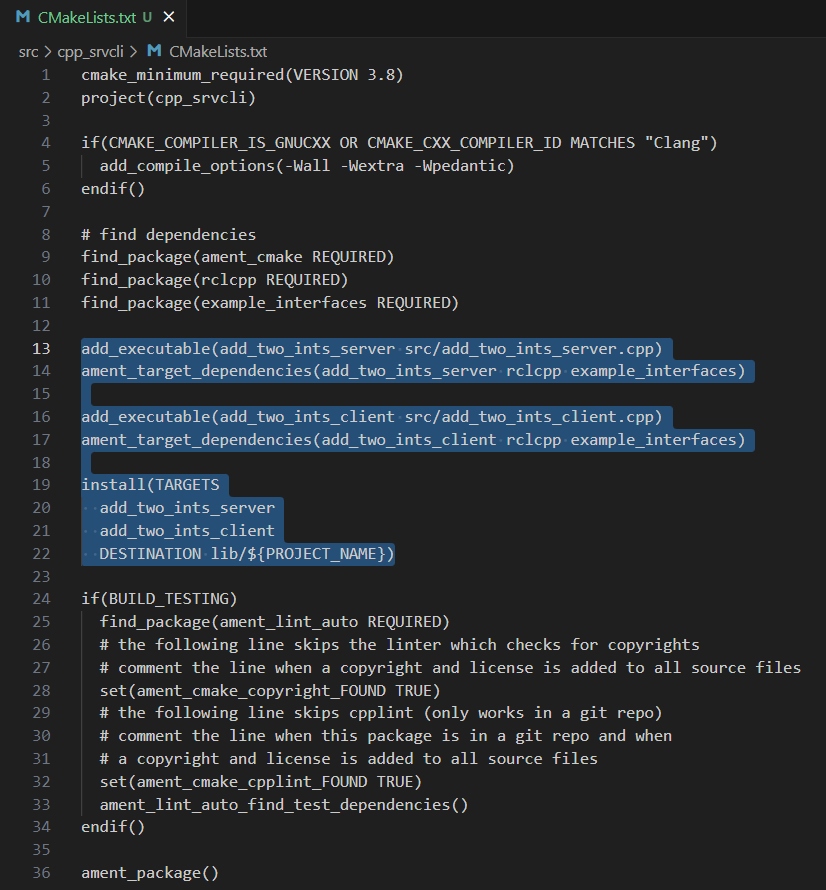
Navigate to cpp_srvcli/CMakeLists.txt` and add the following below the ament_target_dependencies(add_two_ints_server rclcpp example_interfaces) command:
add_executable(add_two_ints_client src/add_two_ints_client.cpp)
ament_target_dependencies(add_two_ints_client rclcpp example_interfaces)

install(TARGETS
   add_two_ints_server
   add_two_ints_client
   DESTINATION lib/${PROJECT_NAME})
Delete this portion of the code, since it is repeated:
install(TARGETS
   add_two_ints_server
   DESTINATION lib/${PROJECT_NAME})
The CMakeLists.txt should be similar to the following:
4. Build service client node and run
At this point the script is created, the dependencies configured and the CMakeLists.txt file correclty setup.
Open a brand new terminal, make sure that no other ROS 2 command is currently running, navigate to the workspace directory and execute:
colcon build --packages-select cpp_srvcli
Now, source the setup file:
source install/setup.bash
For more reference on sourcing the setup file, see sourcing the setup file.
And run the following:
ros2 run cpp_srvcli add_two_ints_client 3 5
The ouput will be something similar to:
[INFO] [1712332516.618397735] [rclcpp]: service not available, waiting again...
[INFO] [1712332517.618645876] [rclcpp]: service not available, waiting again...
...
This is expected as the service itself is not running and the current node is trying to consume a service that does not exist yet.
Open a new terminal and execute the add_two_ints_server node:
ros2 run cpp_srvcli add_two_ints_server
Once, this node is ran, the service becomes available and in the terminal where add_two_ints_client was executed it can be seen this otuput:
[INFO] [1712332538.109592932] [rclcpp]: Sum: 8
Practice
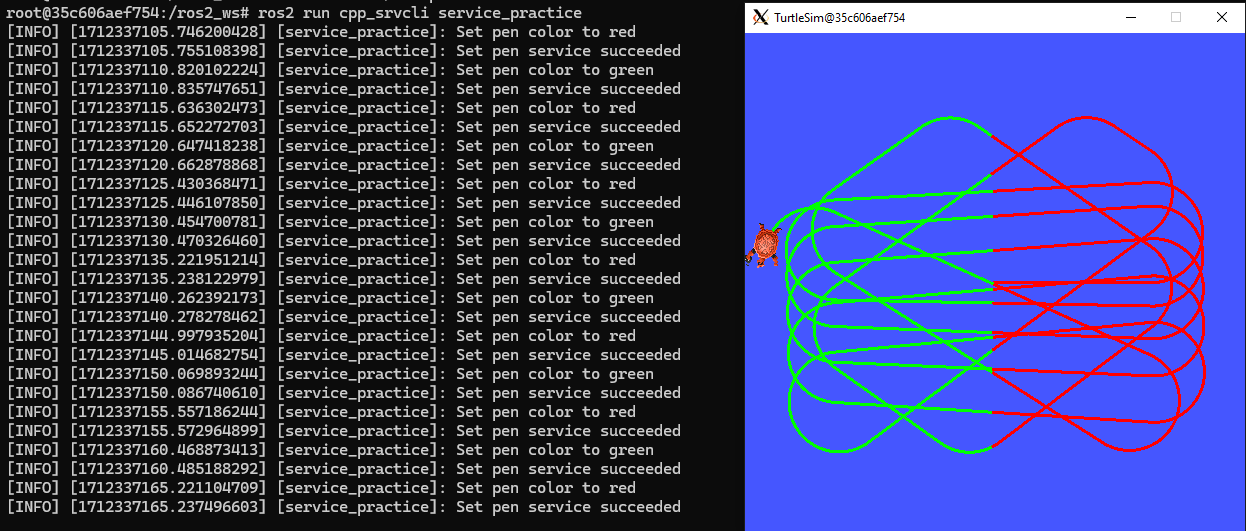
Have trutlesim node running. Create a new node called service_practice that performs:
When the turtle crosses the point x = 5.5 to the right of the screen, its drawing line should change of color to be red.
When the turtle position is to the left of the screen (its x position is lower than 5.5), its drawing line should become green.
Print in the terminal the color that is using.
See image below for an example of the results:
A must-see for completing the practice
The use of rclcpp::spin_until_future_complete() might have entered in conflict with rclcpp::spin() in the service_practice program while trying to accomplish the practice. For that, imagine a relatively simpler problem to address:
In a new terminal, run the service node
add_two_ints_server. This will make theadd_two_intsservice available for use.Open a new terminal, and run a talker node like has been seen in a previous part of the course. Recall to follow all the required steps (adding depencies, configuring the CMakeLists, etc.) to have this node available to use in this package.
With these nodes running, the problem is to create a node that subscribes to the topic called topic, prints the messages that arrive to the topic (just like this previous program) and when the message "Hello, world! 10'" arrives, it calls the add_two_ints service and prints in the terminal the sum of 5 and 2. See an example below.
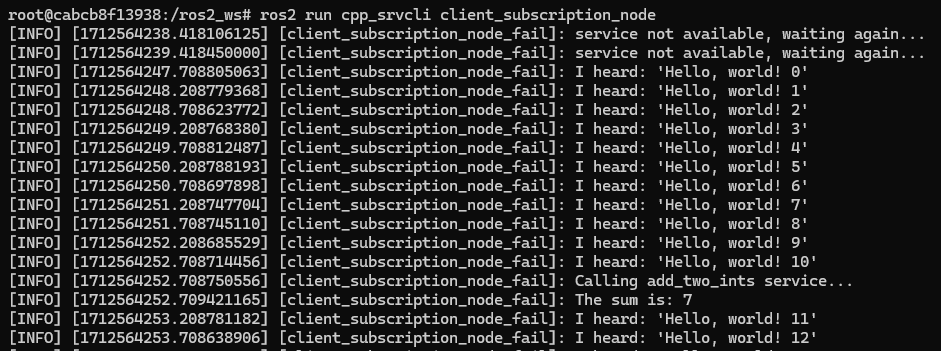
This is a first version of this program. Check the usage of rclcpp::spin_until_future_complete().
#include <chrono>
#include <memory>
#include "rclcpp/rclcpp.hpp"
#include "std_msgs/msg/string.hpp"
#include "example_interfaces/srv/add_two_ints.hpp"

using namespace std::chrono_literals;

class NodeSubscriberClient : public rclcpp::Node
{
public:
   NodeSubscriberClient() : Node("client_subscription_node_fail")
   {
      subscription_ = this->create_subscription<std_msgs::msg::String>(
            "topic", 10, std::bind(&NodeSubscriberClient::listener_callback, this, std::placeholders::_1));

      client_ = this->create_client<example_interfaces::srv::AddTwoInts>("add_two_ints");
      while (!client_->wait_for_service(1s))
      {
            if (!rclcpp::ok())
            {
               RCLCPP_ERROR(this->get_logger(), "Interrupted while waiting for the service. Exiting.");
               rclcpp::shutdown();
               return;
            }
            RCLCPP_INFO(this->get_logger(), "service not available, waiting again...");
      }
   }

   void send_request(int a, int b)
   {
      auto request = std::make_shared<example_interfaces::srv::AddTwoInts::Request>();
      request->a = a;
      request->b = b;

      auto future = client_->async_send_request(request);
      if (rclcpp::spin_until_future_complete(this->get_node_base_interface(), future) !=
            rclcpp::FutureReturnCode::SUCCESS)
      {
            RCLCPP_ERROR(this->get_logger(), "Failed to call service add_two_ints");
            return;
      }

      auto result = future.get();
      RCLCPP_INFO(this->get_logger(), "The sum is: %ld", result->sum);
   }

private:
   void listener_callback(const std_msgs::msg::String::SharedPtr msg)
   {
      RCLCPP_INFO(this->get_logger(), "I heard: '%s'", msg->data.c_str());
      if (msg->data == "Hello, world! 10")
      {
            RCLCPP_INFO(this->get_logger(), "Calling add_two_ints service...");
            send_request(2, 5);
      }
   }

   rclcpp::Subscription<std_msgs::msg::String>::SharedPtr subscription_;
   rclcpp::Client<example_interfaces::srv::AddTwoInts>::SharedPtr client_;
};

int main(int argc, char *argv[])
{
   rclcpp::init(argc, argv);
   auto sub_client_node = std::make_shared<NodeSubscriberClient>();
   rclcpp::spin(sub_client_node);
   rclcpp::shutdown();
   return 0;
}
This will result in an unexpected behavior of the program, the program stops rigth after receiving the "Hello World: 10" message.
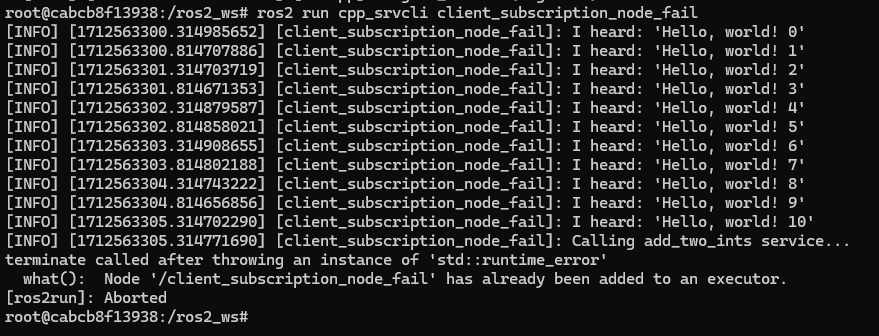
This occurs because spin_until_future_complete() function is called within the callback function listener_callback(). This can lead to a deadlock situation, where the code waits indefinitely for the service call to complete while being stuck in the callback function. This is because the callback function listener_callback() is executed in the context of the ROS 2 executor thread, and this thread is being blocked until the service call completes.
Hence, to avoid this issue, the service call shoul be called asynchronously. One way to achieve this kind of handling is by making the following:
#include <chrono>
#include <memory>
#include "rclcpp/rclcpp.hpp"
#include "std_msgs/msg/string.hpp"
#include "example_interfaces/srv/add_two_ints.hpp"

using namespace std::chrono_literals;

class NodeSubscriberClient : public rclcpp::Node
{
public:
   NodeSubscriberClient() : Node("client_subscription_node_fail")
   {
      subscription_ = this->create_subscription<std_msgs::msg::String>(
            "topic", 10, std::bind(&NodeSubscriberClient::listener_callback, this, std::placeholders::_1));

      client_ = this->create_client<example_interfaces::srv::AddTwoInts>("add_two_ints");
      while (!client_->wait_for_service(1s))
      {
            if (!rclcpp::ok())
            {
               RCLCPP_ERROR(this->get_logger(), "Interrupted while waiting for the service. Exiting.");
               rclcpp::shutdown();
               return;
            }
            RCLCPP_INFO(this->get_logger(), "service not available, waiting again...");
      }
   }

   void send_request(int a, int b)
   {
      auto request = std::make_shared<example_interfaces::srv::AddTwoInts::Request>();
      request->a = a;
      request->b = b;

      auto future = client_->async_send_request(request, std::bind(&NodeSubscriberClient::handle_add_two_ints_response, this, std::placeholders::_1));
   }

   void handle_add_two_ints_response(rclcpp::Client<example_interfaces::srv::AddTwoInts>::SharedFuture future) {
      auto response = future.get();
      if (response) {
            RCLCPP_INFO(this->get_logger(), "The sum is: %ld", response->sum);
      } else {
            RCLCPP_ERROR(this->get_logger(), "Failed to call service add_two_ints");
      }
   }

private:
   void listener_callback(const std_msgs::msg::String::SharedPtr msg)
   {
      RCLCPP_INFO(this->get_logger(), "I heard: '%s'", msg->data.c_str());
      if (msg->data == "Hello, world! 10")
      {
            RCLCPP_INFO(this->get_logger(), "Calling add_two_ints service...");
            send_request(2, 5);
      }
   }

   rclcpp::Subscription<std_msgs::msg::String>::SharedPtr subscription_;
   rclcpp::Client<example_interfaces::srv::AddTwoInts>::SharedPtr client_;
};

int main(int argc, char *argv[])
{
   rclcpp::init(argc, argv);
   auto sub_client_node = std::make_shared<NodeSubscriberClient>();
   rclcpp::spin(sub_client_node);
   rclcpp::shutdown();
   return 0;
}
See that spin_until_future_complete() function is not being used anymore to avoid blocking the ROS 2 executor thread. Instead, asynchronous service calls are used properly and a separate method handles the service call asynchronously. This method was named handle_add_two_ints_response(). Below, there is a detailed explanation of what is happening:
First, the
send_request()function works fine and finishes its execution by making the asynchronous call to theadd_two_intsservice. Additionally, the response of theasync_send_request()function is binded to thehandle_add_two_ints_response()function. Meaning that thehandle_add_two_ints_response()function will be executed when the service request has been responded.The
handle_add_two_ints_response()callback function simply checks if the result of theFutureobject is none so that it can print a log messages indicating that the results of the sum or that the service call has failed.
Overall, send_request() function prepares and sends the service request, and handle_add_two_ints_response() processes the response when it becomes available asynchronously. This asynchronous approach allows the node to continue processing other events while waiting for the service response.